tech support 8

  • Subscribe to our RSS feed.
  • Twitter
  • StumbleUpon
  • Reddit
  • Facebook
  • Digg
Showing posts with label print. Show all posts

Friday, 22 November 2013

Print Styles Are Media Queries

Posted on 13:07 by Unknown


I have alluded to this point in the past. Usually when I get off on a rant about print styles, I lump it into the overall process of making responsive sites and I use media query formatting in my examples. But I haven't just flat-out said that print styles are media queries.


I believe I always assumed that the reader would just understand that in the context of my writing, in using print styles on sites, and understanding that print is a medium in which web pages have been displayed for years.


Peter-Paul Koch (@ppk on Twitter) has spent years tracking browser support for even some of the most minute features. From way back in the evolt.org days I've watched him dive into testing without concern for his own wellbeing (browsers have sharp edges). Most recently he put out calls on the Twitters for web developers to fill out a survey about how they use media queries.


I did not grab a screen shot of the survey, but he asked the following two questions (which you can glean from the raw results):


  1. Which media queries have you used AT ALL in practical projects in the past year?

  2. Which media queries have you used in MORE THAN HALF of your practical projects in the past year?


He presented the following options:


  1. width

  2. height

  3. device-width

  4. device-height

  5. device-pixel-ratio

  6. resolution

  7. orientation

  8. aspect-ratio

  9. device-aspect-ratio

  10. Other


You'll note that “print” is not an option. Despite that, 1% of his respondents to the questions (of the 33 and 23, respectively, that chose “other”) wrote in “print,” because that's what this chart indicates in his write-up (Media query/RWD/viewport survey results):


Media query use
Media query Regular use Occasional use
width 84% 7%
device-width 32% 15%
device-pixel-ratio 25% 18%
height 17% 16%
orientation 13% 20%
resolution 9% 5%
device-height 7% 7%
aspect-ratio 3% 4%
device-aspect-ratio 3% 3%
print
1% 1%


I want to be clear, I am not faulting PPK. His survey was very much about the work he's been doing lately understanding how viewports, pixel densities, and screen sizes are reported across the current landscape (jungle) of devices. Instead, I am happy that 1% of his 1,251 respondents consider print to be a media query and took the time to make it a write-in answer.


Now I just wonder how long before the other 99% would do the same. Or even for the much smaller percentage who write media query tutorials, examples, libraries, CMSes, and so on.


@ppk I’m really sad there are only 1% print MQs…

— Nicolas Hoizey (@nhoizey) November 22, 2013


Related


If you want to learn how print media queries can be useful to you, please follow the links below (which themselves contain many more links). “The more you know.”


  • My WordCamp Buffalo 2013 Presentation: Making Your Site Printable, Sept. 14, 2013.

  • My Presentation Slides: Making Your Site Printable, May 19, 2013.

  • Tracking When Users Print Pages, Mar. 26, 2013.

  • Calling QR in Print CSS Only When Needed, Mar. 8, 2013.

  • My Print Styles Article in .net Magazine, Jul. 18, 2012.

  • Announcing PrintShame.com, Apr. 9, 2012.

  • More Evidence of the Need for Print Styles, Apr. 6, 2012.

  • Test in Lynx and Print, It's Your Job, Dec. 12, 2011.

  • More Samples of Responsive Web Design ≠ Print, Oct. 13, 2011.

  • Print Styles Forgotten by Responsive Web Developers (at evolt.org), Oct. 4, 2011.

Read More
Posted in css, print, standards, usability, UX | No comments

Friday, 27 September 2013

Slides: Responsive Web Design Primer

Posted on 10:47 by Unknown


Yesterday I had the pleasure of visiting the University at Buffalo (my alma mater) to give a presentation for its CIT professional development series. I got to talk about responsive design.


Knowing in advance that the room would have technical and non-technical users I went for a code-free presentation. One thing I learned is that code would have been useful, so if you're looking for any in here you won't find it.


I understand there is video from the event, and as soon as I have it I'll share it here as well. In the meantime, enjoy the slides without any context. Which may be more entertaining than my typically awful attempts at humor.


Responsive Design Overview for UB CIT from Adrian

Read More
Posted in accessibility, css, design, html, mobile, print, project management, speaking, standards, touch, usability, UX | No comments

Saturday, 14 September 2013

My WordCamp Buffalo 2013 Presentation: Making Your Site Printable

Posted on 19:42 by Unknown


Official 2013 WordCamp Buffalo banner.


Today I spoke at Buffalo's second WordCamp. I am a casual WordPress user, not a developer, though my decade-and-a-half experience with multiple blogs and content management systems (even writing our own CMS at Algonquin Studios) gives me plenty of insight into the common challenges users and developers face across all platforms.


I have also learned that few developers work on just one platform. Nearly all of us touch more than one platform in our careers (or workday), and my experience from last year is that everyone attending falls into that boat. When I made these slides I wanted to make sure I was presenting ideas and concepts that developers could take to any platform.


There will be video of my talk (featuring my awful sense of humor) in probably a month or so (based on last year's timeline). When it's available I will post it here.


That being said, you don't need to be a WordPress developer to get something from these slides. Enjoy!


Making your site printable: WordCamp Buffalo 2013 from Adrian


In addition, I collected a couple tweets about my talk (yay, validation!):


Brilliant tip from @aardrian to use the Google Analytics tracking image to track prints. BRILLIANT. #wcbuf

— Chris Van Patten (@ChrisVanPatten) September 14, 2013


@aardrian being a jerk at http://t.co/JQcJ7zxNim #wcbuf

— Ben Dunkle (@EmpireOfLight) September 14, 2013


Bonus: Links to Slides from Talks I Attended


Slides from my #wcbuf talk: "Building Themes and Plugins: Everything But Code" http://t.co/8aHrT3IHNX

— Chris Van Patten (@ChrisVanPatten) September 15, 2013


#wcbuf slides http://t.co/jUs13KTwQK thanks to everyone who came, it was perfect!

— Ben Dunkle (@EmpireOfLight) September 15, 2013


Extra Bonus


Looks like the WooThemes slider/carousel will be getting Google Analytics event tracking built in for a future release — now you don't need to be a coder to figure out if anyone is clicking your carousel:


Yay, @tomharrigan and I will chat about getting GA event tracking features into WooSlider! #wcbuf (now he's stuck)

— Adrian Roselli (@aardrian) September 14, 2013


Read More
Posted in print, speaking | No comments

Monday, 9 September 2013

Speaking at WordCamp Buffalo 2013

Posted on 08:35 by Unknown


Official 2013 WordCamp Buffalo banner.


This Saturday I will be speaking at Buffalo's second WordCamp. Last year was a great day-long event filled with many good speakers (not just me!), so I am looking forward to being an attendee as well.


If you are new to WordCamp Buffalo, a quick overview:


WordCamp Buffalo is a one day conference held in Buffalo, NY focusing on WordPress. Our goal is to increase knowledge about WordPress for people who already are working with it, and show some benefits of using it for anyone who may be interested, but aren’t currently working with WordPress.


As a regular WordPress user with over 15 years experience in content management as a concept and more than a decade experience having built our own multi-lingual enterprise web content management system (QuantumCMS) at Algonquin Studios, my talk should give you skills you can take to any platform. An abstract of my talk, Making Your Site Printable, is on the WordCamp Buffalo site. I'll post slides here after the talk.


For the talk I'll be drawing on my 20 years of web development experience, extensive work with responsive design, articles I've written for .net Magazine and Web Standards Sherpa, previous talks, my PrintShame site, and Google Analytics. It's guaranteed to be awesome (guarantees not guaranteed).


Last year I spoke at WordCamp Buffalo on the topic Content Strategy. The slides and video of my talk are online for you to watch, in case you want to make sure I speak well enough to warrant buying a ticket to see me this year.


You can learn more about the other sessions and speakers at the WordCamp Buffalo site. Here's a handy map:


View Larger Map
Read More
Posted in print, speaking | No comments

Sunday, 19 May 2013

My Presentation Slides: Making Your Site Printable

Posted on 15:06 by Unknown


On Friday, May 17 I had the pleasure of speaking for the first time at Stir Trek, a one-day conference in Columbus, Ohio, that drew over 1,200 attendees (and I understand sold out in just a few minutes). Apparently the name is a reference to the MIX developer conference, for which they were unable to obtain license to use a variation on the name.


I also had the pleasure of presenting for the first time on best practices for making your web site printable, built from my own professional experience, my PrintShame site, and an article I wrote for .net Magazine, among other resources (also linked in the presentation).


With 40 great speakers across 8 different tracks, there was quite a lot on offer throughout the day. Considering the other presentations held at the same time as mine, I was thrilled to get any audience and more excited to see that those who attended saw value in the topic and asked great questions throughout.


As promised in the session, I have made my slides available online via SlideShare and embedded them here:


Well after the talk I got even more questions and feedback on the session, which I truly appreciated. Since there is no official survey for attendees to give feedback on a speaker, I am hoping any attendees will feel comfortable tweeting about it or leaving a comment here. So far I have gotten one great bit of feedback on Twitter:


Lest anyone think I'm just terminally negative, @aardrian had a REALLY GOOD talk on accessibility. And printability.

— David Longshore (@DavidLongshore) May 17, 2013


(I worked in some accessibility tips during my presentation.)


All other feedback is welcome (including if I was loud enough when the lavalier microphone failed).


While in Columbus I also had the pleasure of having a nice dinner (I arrived too late to make the speaker dinner), visiting the North Market, and, as part of the conference, getting to see a double feature of Iron Man 3 and Star Trek: Into Darkness. All around a good time which I look forward to repeating next year.


Read More
Posted in css, html, print, QR, speaking, standards, UX | No comments

Tuesday, 14 May 2013

Balancing Act: Features, Budgets & Timelines at Web Standards Sherpa

Posted on 13:55 by Unknown


As of today I am an author over at Web Standards Sherpa. I wrote an article discussing the process of juggling a no-budget, tight-timeframe web site for Buffalo Soccer Club while still trying to adhere to best practices. The article is titled "Balancing Act: Features, Budgets & Timelines."


I get a chance to talk about responsive design and even rant just a little bit about print styles (the article itself prints well, too). The article also has the nifty ReadSpeaker feature which means that the page can read the article aloud to you in a voice that is entirely unlike mine (at least it's a male voice by default).


Balancing Act: Features, Budgets & Timelines
Adrian offers insight into the decision process of building a new site for the Buffalo Soccer Club, a not-for-profit with little to no budget and a looming deadline. Read it…


Read More
Posted in accessibility, clients, css, html, mobile, print, project management, standards | No comments

Tuesday, 26 March 2013

Tracking When Users Print Pages

Posted on 11:33 by Unknown


A few months ago I had the pleasure of writing a piece for .net Magazine about print styles (Make your website printable with CSS). It was posted to .net's web site last month and received an overwhelming one comment. That comment, however, summed up something I hear all the time:


Would be interesting to see some statistics on how many people actually print websites.


For years I have argued that the best user statistics are those for the site you are building. In the absence of global numbers for how many users print web pages, in this post I'm going to show you how you can measure how many (and which) pages get printed from your site by using Google Analytics. I am also hoping those who know everything about Analytics can answer some of my questions.


The Concept


While looking around for existing solutions to track printed pages, I found this article: Use Google Analytics to Track When People Print your Web Pages (written exactly one year before I got my own code working). While there doesn't appear to be anything wrong with this approach (I did not try it), how it both produces the tracking code (JavaScript) and presents the data in Analytics (different than how I report on custom events), doesn't match my preferred approach.


I want to be able to call the Google Analytics tracking image (__utm.gif) only when the page is going to be printed, skipping unnecessary HTTP calls and the resulting image download (brief though it is). I rely on the CSS @media print declaration to call the image. I also don't want to write that image call to the page with yet more client-side script when I can assemble it all right on the server.


Since my post Calling QR in Print CSS Only When Needed already outlines the general flow (presuming I only want to support Internet Explorer 8 and greater), I can lean on the CSS syntax there.


To reiterate this technique will not work in versions of Internet Explorer 7 and earlier.


Constructing the Query String


I had a heck of a time finding information on how the Analytics query string needs to be constructed, and when I did find information it didn't always explain the values in much detail.


Google's developer site has information on all the query string parameters for the GIF request, but no information on what is required or what all the possible values might be. I did find a list of what may be the required parameters while searching among a thread on tracking emails with Analytics. Through a good deal of experimentation I came up with the following minimum list for my purpose:


Variable Description
utmac Account String. Appears on all requests. This is your UA-#######-# ID.
utmwv Tracking code version. While my standard GA requests use 5.4.0, I opted to use 4.3 for reasons I no longer recall.
utmn Unique ID generated for each GIF request to prevent caching of the GIF image. I just concatenate the current year, month, day, hour, minute and second.
utmhn Host Name of your site, which is a URL-encoded string.
utmr Referral, complete URL. In this case I just insert a dash so it is not blank.
utmp Page request of the current page.
utmt Indicates the type of request, which is one of: event, transaction, item, or a custom variable. If you leave it blank, it defaults to page. Because I am tracking events, I use event.
utme Extensible parameter. This is where you write your event. I use 5(Print*{page address}). See below for why.
utmcc Cookie values. This request parameter sends all the cookies requested from the page. It can get pretty long. It must be URL encoded. It must include __utma and __utmz values.


Because the whole point of this is exercise is to track the event in Google Analytics, it was important to understand how to construct the event for the query string. I struggled a bit.


Lazyweb: Can anyone point me to a reference that explains the "5" in Google Analytics query string event params? eg: utme:5(Print)(/Engage)

— Adrian Roselli (@aardrian) March 25, 2013


I still haven't figured out what the number 5 maps to, but it works. I also found that I need an asterisk as a separator, though I found no documentation explaining it. In the end, the only way a print event tracked as I wanted was when I constructed it as: 5(Print*/Accessibility). In this example, /Accessibility is the address of the page I am tracking.


The other tricky bit is pulling the cookie value and stuffing it into the string. Conveniently I can get to this within our content management system (QuantumCMS, which you should use) on the server side. Many others (if not most or all) have a similar ability. At the very least you have to include the __utma and __utmz values, passed as encoded parameters for utmcc. Without these, my tracking would not fire.


The Completed Query String


For ease of reading, I will break the string to a new line at each &. This represents what is generated when I visit the careers page on the Algonquin Studios site using Opera.


http://www.google-analytics.com/__utm.gif
?utmac=UA-1464893-3
&utmwv=4.3
&utmn=2013326124551
&utmhn=algonquinstudios.com
&utmr=-
&utmp=/Engage/Careers
&utmt=event
&utme=5%28Print*/Engage/Careers%29
&utmcc=__utma%3D267504222.1477743002.1364314722.1364314722.1364314722.1%3B%2B__utmb%3D267504222.17.7.1364314901604%3B%2B__utmz%3D267504222.1364314722.1.1.utmcsr%3D%28direct%29|utmccn%3D%28direct%29|utmcmd%3D%28none%29


Constructing the CSS


Now that you have the query string and the Google Analytics tracking image, you just need to call the image when the page is printed. All you need to do is embed a style block at the top of your page with the print media query, and call the image within it:


@media print {
header::after
{ content: url(http://www.google-analytics.com/__utm.gif?utmac=UA-1464893-3&utmwv=4.3&utmn=2013326124551&utmhn=algonquinstudios.com&utmr=-&utmp=/Engage/Careers&utmt=event&utme=5%28Print*/Engage/Careers%29&utmcc=__utma%3D267504222.1477743002.1364314722.1364314722.1364314722.1%3B%2B__utmb%3D267504222.17.7.1364314901604%3B%2B__utmz%3D267504222.1364314722.1.1.utmcsr%3D%28direct%29|utmccn%3D%28direct%29|utmcmd%3D%28none%29); }


If you read my post on embedding QR codes, then this code will be familiar — I use header::before in that example. As such, I use header::after here so you can use them both keyed off the same element (header) without conflict.


If you look closely, you may have noticed that my event parameter looks like 5%28Print*/Engage/Careers%29 instead of 5(Print*/Accessibility). I URL encoded the parentheses on the entire string to make certain that they do not conflict with the parentheses in the CSS. If you don't do that, the browser will get confused and fail to load the image.


Once you have the CSS in place, I recommend going into HTTP Fox or the Chrome Developer Tools to make sure the image is called when you fire a print preview (save paper!), and then to make sure it has the parameters you expect — particularly the utme value:


Screen shot of Chrome Dev Tools.
Screen shot of Chrome Dev Tools showing the query string parameters for the tracking GIF.


Checking Your Google Analytics Report


Assuming you've verified all is working well, you just need to run a report for events in Google Analytics. Bear in mind that Analytics isn't up-to-the-minute, so you may need to give it some time to capture all the data.


Log into your Analytics account and make sure you set the report date to the time period where you rolled out these changes. Choose "Content" from the "Standard Reports" on the left side. From there, expand "Events" and then select "Top Events." You should see "Print" as one of the items in the "Event Category" column (you may need to show more rows).


Screen capture from Google Analytics
After you click "Top Events," you will see all of the events you are tracking (if any other).


Click on the word "Print" in that grid and you will see all the pages that were tracked (ostensibly because you or a user printed the page).


Screen capture from Google Analytics
The report is handy if you know the page addresses, but Analytics doesn't think of them as such. As a result, clicking the addresses will not take you to the page.


From here you can run a secondary dimension to cross-reference this with more information. In my example, I tested different pages in different browsers so I could quickly verify the cross-browser support. You can run screen resolution, landing page, or any other dimension that you think might be handy to compare.


Screen capture from Google Analytics
An example comparing the printed pages with the browser as a secondary dimension of the report.


Conclusion


I am just adding this to my own site, so I don't have any numbers to offer as part of this post. However, if you implement this please feel free to let me (and everyone) know how many users you have who print and for what site. I don't expect the numbers to be high, but I do expect to see it happen here and there.


If you have any additions, corrections or suggestions, please let me know. I am still unclear how all the Google Analytics query string parameters come together and exactly what they all mean, so there may be some optimizations I can work into it.


Related


Related articles on print styles:


  • Printing The Web by Hans Christian, March 25th, 2013.

  • Tips And Tricks For Print Style Sheets at Smashing Magazine, March 8th, 2013.

  • CSS Paged Media Module Level 3 at W3C.

  • Use Google Analytics to Track When People Print your Web Pages, March 26, 2012.


Stuff I've Written


  • Calling QR in Print CSS Only When Needed, March 8, 2013.

  • Make your website printable with CSS from .net Magazine issue 231 (Summer 2012) and the web site as of March 5, 2013.

  • Announcing PrintShame.com, April 9, 2012.

  • More Evidence of the Need for Print Styles, April 6, 2012.

  • Test in Lynx and Print, It's Your Job, December 12, 2011.

  • More Samples of Responsive Web Design ≠ Print, October 13, 2011.

  • Print Styles Forgotten by Responsive Web Developers, October 4, 2011.


Read More
Posted in analytics, css, print, standards | No comments

Friday, 8 March 2013

Calling QR in Print CSS Only When Needed

Posted on 09:46 by Unknown


For those of us who put together print styles for our sites, we've probably tossed around the idea of embedding QR codes so that users can quickly get back to a page they have printed. In the hardcopy version of my article for .net Magazine, "Make your website printable with CSS," I show how you can embed QR codes in your page (it's not included in the online version).


In my example I use the Google Charts API to generate the QR code on the fly. The problem in my example is that the QR code image gets called whether or not you print the page. Not only is this an additional HTTP request, it's also an additional download that immediately gets hidden. This puts a bandwidth burden on users who aren't printing, but it's also the only way to support your users on Internet Explorer 8 and below (who may be the ones trapped at the office who want to bring the document home).


If you truly have no IE8 or below users, then the less bandwidth-hoggy approach is rather simple, if a bit inelegant.


Since each call to the Google Charts API to get the QR code must include the full address of the page, I cannot leave this to my linked CSS file (which is static, not run through any server-side processing), nor would I want to push every URL for every page of my site into that file. Initially I wanted to use a data- attribute to hold the URL and then, using the generated content feature of CSS, have it take that value and feed it into the content: CSS declaration to have it generate the image from there. Except that's not how CSS works. You cannot use CSS to generate an image from a CSS variable.


The easiest solution is to a put a style block at the top of your page (something I hate doing) and feed the current page's URL into the Google Chart API query string to dynamically draw the image. The rest of the styles that affect placement, spacing, etc. should all be in your print stylesheet already. The example:


@media print {
header::before
{ content: url(http://chart.apis.google.com/chart?chs=120x120&cht=qr&chl=http%3A%2F%2Falgonquinstudios.com/Engage/Careers); }
}


That's it. Now when (and only when) you call the print styles, the image will load. As proof, here is a screen shot using HTTPFox showing the page before the print styles were called and after, where you can clearly see the QR code is called only when the print styles are fired.


Screen shots of the list of HTTP requests before and after the print styles were fired. You can click / tap to see the full-size image.


Screen shot of the print preview with the generated QR code in place.


Note: This technique will not work in any version of Internet Explorer that doesn't support CSS generated content, which includes IE 8 and below. Internet Explorer 9 and above happily include the QR code generated with this method.


Update: March 26, 2013


I build on this technique to show you how you can use Google Analytics to track which and when pages of your site are printed: Tracking When Users Print Pages.

Read More
Posted in css, design, print, QR, standards, usability | No comments

Wednesday, 18 July 2012

My Print Styles Article in .net Magazine

Posted on 07:41 by Unknown


The Summer 2012 (#231) issue of .net Magazine has my tutorial on making print styles for your site. Not only did I get four pages, the article got a mention on the front cover (small though it is) and my photo in the contributors section.


If you've spent much time here or following me on Twitter, then you know I have written plenty about the lack of print styles on modern sites, particularly those claiming to use responsive techniques. I figured it was about time I showed some techniques to make it happen and hopefully demonstrate how dreadfully simple print styles are to do.


While my article is clearly the stand-out piece in the magazine, and totally worth getting just for my work, there is some other stuff in this issue that might interest you:


Creating flexible layouts that will work on any device and any screen size is the next big challenge for CSS. In this month's issue Peter Gasston takes us on a tour of some well-implemented properties you can use now as well as the exciting proposed properties we could be using in the future.


There's also a guide to creating or updating your online portfolio from Gary Marshall, an interview with Elliot Jay Stocks and tutorials on HTML5's Drag and Drop API and building a basic responsive site with CSS. Here are some more highlights:


  • Build smoother JavaScript apps

  • Make your website printable

  • Make your sites load faster

  • The pro's guide to Adobe Edge

  • Build an ecommerce store

  • Using PHP Data Objects


By the way, in case you want to read up on some of my prior discussions about print styles, here's a handy list of links for you:


  • Print Styles Forgotten by Responsive Web Developers, October 3, 2011.

  • More Samples of Responsive Web Design ≠ Print, October 13, 2011.

  • Test in Lynx and Print, It's Your Job, December 12, 2011.

  • More Evidence of the Need for Print Styles, April 6, 2012.

  • Announcing PrintShame.com, April 9, 2012.


Update, March 5, 2013


My print CSS article has appeared on the .net Magazine web site, though the web site excludes the sidebars on Print Shame and QR codes in print layouts.

Read More
Posted in css, html, print, standards | No comments

Monday, 9 April 2012

Announcing PrintShame.com

Posted on 15:52 by Unknown


Screen shot of PrintShame.comFor many years I've pushed for print styles for sites. It's an easy step to take in the course of developing a site, easy to test, and the techniques to do it have been around for over a decade. Something as rigid as a tabled layout could be relatively easily wrangled into a print-friendly document — without breaking any budgets.


With all the excitement over supporting mobile devices, web developers have been adopting the concept of responsive web design (RWD), which allows your layouts to scale and reflow based on the device and browser size the visitor is using. Yet somehow the gee-whiz factor of these techniques has not helped the printed page, particularly on web sites that are often regarded as great examples of RWD.


This weekend I was looking at sample sites that either proudly proclaim their RWD heritage, or which are held up by others as great examples of RWD. Having already been burned by sites that take a dozen pages to print one tiny piece of content I started testing their print styles and found that, for the most part, they had none. I decided that perhaps the only way to get anyone to address this was to use shame.


I registered PrintShame.com, made a new Blogger site (the same platform my personal blog uses), and got to work gathering the printed output of sites as PDF files to share with everyone.


I am only grabbing sites that claim to be the result of RWD and for now I am pulling URLs from Media Queries, a site that gathers examples of responsive design. The collection of sites can be ordered by popularity and so that's how I've started. I am excluding some that aren't fully built (though I have no idea why they are listed and ranked so well), but for the most part I am just grabbing what's there. I will probably also grab other sites that folks recommend, as I did in one of the posts I link below.


The process is quite simple: I capture a screen shot of the site in my 1,024 x 1,024 Firefox window with all my normal chrome. I also print the page to PDF. Usually I use the home page, but sometimes it's not appropriate and so I grab a contact page, an article, a product page, or even an event schedule. Then I post the screen shot and the PDF to Print Shame with a link to the original page.


Sometimes the printed pages are abysmal, and sometimes they aren't so bad. I am only posting them if there is something that I find poorly done. This ranges from excessive number of pages to failure to include the brand on the printed page. I am also posting without comment. I figure if a site owner sees his or her site there and thinks that the print output looks good, then that site owner probably needs to redefine his or her goals with the site.


You may note that Print Shame doesn't have print styles. That's a function of using Blogger. I don't really care to make a full RWD site with print templates and the like when it's far faster to just do fly-by postings in my otherwise busy life. Poorly-built sites without print styles have already taken enough of my time.


With this site I hope to demonstrate how some of these well-regarded responsive sites and show how they fall short in the most basic ways. Perhaps this is the only way to get site owners to pay attention.


Some relevant articles / blog posts:


  • More Evidence of the Need for Print Styles, April 6, 2012.

  • Test in Lynx and Print, It's Your Job, December 12, 2011.

  • More Samples of Responsive Web Design ≠ Print, October 13, 2011.

  • Print Styles Forgotten by Responsive Web Developers, October 3, 2011.

Read More
Posted in browser, css, print, rant, standards | No comments

Friday, 6 April 2012

More Evidence of the Need for Print Styles

Posted on 10:26 by Unknown


PrintFriendly logoReaders of this blog know of my regular frustration with web sites that don't have print styles. Part of this is fueled by all the lip service supposed responsive web developers pay to adapting to different screen sizes, but who fail to consider the printed page when we've had support for over a decade now.



Yesterday I stumbled across the site PrintFriendly. It promises to remove "Ads, Navigation and web page junk" (odd capitalization theirs). It positions itself as a way to save paper and ink and offers both a button for your browser toolbar to clean up sites like CNN when you print them, and a button for your own site to allow users to print your content. It can also output PDF documents if you don't want to print to paper.


For End Users


As someone who frequents sites that don't print well, I can tell you that this service can be handy. For the CNN page I tested (PDF of page fed through PrintFriendly) — which is linked off the PrintFriendly home page as an example — it clears out the banner imagery, advertisements, navigation, and lots of other cruft. It also removes the branding and turns the links in the page to light gray, making them a bit hard to see. As someone who has chosen to print a page from CNN, I know where it came from, but I can't quite forgive the too-light links.


In a previous post, you may recall samples I provided of highly-regarded responsive sites that have terrible print styles, specifically the Ampersand Conference (PDF of the printed schedule) and the New Adventures in Web Design 2012 conference (PDF of the printed schedule).


other than some minor oddities, the New Adventures in Web Design 2012 conference (PDF of page fed through PrintFriendly) fares pretty well. The Ampersand Conference page (PDF of page fed through PrintFriendly), however, doesn't and all the content is lost beyond the logo and a quick intro.


I may use it for those rare times I need to print an article from a major site that doesn't provide any print options at all. It can come in handy.


For Businesses/Organizations


PrintFriendly gives you the option to add its print button to your web site. This is geared to web site owners who don't have print friendly pages as well as blog owners who have no control over print styles (or lack thereof).


That there are organizations out there that consider this a viable option at all is absurd. Let me explain why…


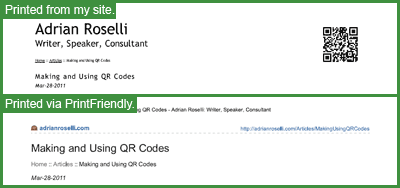
To test it, I dropped the JavaScript-powered widget on an article on my site and printed some pages. You can compare the PDF version of my article using my print styles with the PDF version of the same article from PrintFriendly.


Loss of Control over Content


When I use the feature to print a page, I am given the option to remove imagery and any other element on the page. I can remove entire paragraphs of content from the printed page of a site I do not control. In addition, my footer is removed, which means if my contact information was there (phone, mailing address), it's gone now. The footer is also where I keep my copyright statement and some additional branding, which are both lost as a result.


Users may have a valid reason to remove elements of your content, usually to fit on a page, but what about users who may just want to print cherry-picked content to push an agenda? Are you also willing to let whatever content sits in your footer be purged? Someone motivated by your content while reading from paper is already offline, and a phone number or address is that much more valuable to display.


Advertisements Presented to Users


After printing I am presented with a box of advertisements. I saw ads for used tennis machines, metal forming machines, ultrasonic cleaners, and one large graphic ad for vending machines. None of these compete with what I offer in any way. They don't appear to be keyed off my content, but I cannot be certain.


If you sell a service or a product, are you willing to take the risk that users to your site, when printing a page, may be offered advertisements for your competition? Will those users understand that you don't endorse those services or products even if they aren't competition? Are you willing to take that risk?


Loss of Branding


The first thing I noticed on the printed pages I tried was that the branding was typically removed. Seemingly whatever lives at the top of the page, which probably contains your logo, tagline, and perhaps other important details, is removed. Even my site was affected, and I use text for my "logo" and tagline.


Considering how much effort (time and money) you may have spent in tweaking your brand and message for your site, are you comfortable having it summarily removed from every printed page? When the end user passes this printed page along to another, do you feel you are losing an opportunity to present your brand to the next reader?


Page Reformatting


There are elements of copy or imagery that are intentionally positioned in my content to draw visual connections. For non-visual users I make sure it linearizes (that's how it starts). But since the printed page is a visual medium, I often rely on the ability to continue to maintain those visual relationships. Those are discarded in the PrintFriendly version of the page.


If you have sidebars, pull-quotes, or other elements that are distinct from the main content and may be confusing to users not used to seeing content linearized (which are nearly all sighted users), then you may find reading comprehension suffers. It will take some effort to identify all the elements of content on your site and test how they behave in this model.


Find a New Web Developer


Any current web developer who cannot or will not create print styles for your site is probably not someone you want to use anymore. Even if your web developer isn't up on the new hotness of responsive web design techniques, that's not an excuse. Print styles pre-date nearly everything going on with the web now. Print styles work with tabled layouts, with ads, with all sorts of elements on your page. There is no good excuse not to include them in any web site built within the last 10 years.


If your web developer recommends PrintFriendly, make sure you understand why. If the answer is couched in lack of technical ability to develop print styles or just laziness, the decision should be pretty easy.


Related


  • Test in Lynx and Print, It's Your Job

  • More Samples of Responsive Web Design ≠ Print

  • Print Styles Forgotten by Responsive Web Developers

Read More
Posted in css, print, rant, standards | No comments

Monday, 12 December 2011

Test in Lynx and Print, It's Your Job

Posted on 13:47 by Unknown


Screen shot of AdrianRoselli.com in Lynx.


I have admittedly not taken the time to attend An Event Apart any of the times it's been held, but I do tend to follow the #aea hashtag on Twitter so I can glean at least a little wisdom from the discomfort of my own desk as I wade through more mundane tasks.


That means I sometimes see tweets like the one below which, taken out of context, get my blood boiling:


@adactio showed his site working in different browsers (incl. Lynx!), devices, screen readers and print. Seeing (one web) is believing. #aea


I try hard not to Tweet in anger, but sometimes they slip out:


It seems folks at #aea are impressed that a modern site will still work in Lynx. How is that novel and not a fricking requirement?


Attendees of #aea also impressed that a responsive design has print styles? Also a requirement, not something to brag about.


I had just this morning been taking time to review my own site in Lynx after a minor update, as I do after every update, just to make sure my alt text, page structure, content, navigation, etc. were all working the way they should. Lynx is part of my regular testing suite. It also helps remind me that reliance on JavaScript for things that can be handled on the server or with CSS isn't such a good idea.


I can't imagine a testing process that doesn't include Lynx. Lynx is the truly lowest common denominator on the web. It gives you insight into how a page is structured, how assistive technology will approach it, and even how search engines will perceive it.


In addition to testing in Lynx, I always look at how a page prints. I create a PDF from a handful of browsers for every project, targeting the home page, content pages, and some outliers (odd templates, gallery chaos, JavaScript flim-flam, and so on). I think that should be expected of all web developers, though clearly it is not. This particular issue has frustrated me more than once, as I outline in my posts Print Styles Forgotten by Responsive Web Developers and More Samples of Responsive Web Design ≠ Print.


Add together my beliefs about Lynx support and print styles, and I cannot accept that anyone would consider this to be something more than the most basic standard practice. Do we get excited when our pages validate? When we choose the right element? Do we celebrate when Twitter pushes out one of our tweets? When Google Analytics produces a chart? When my email gets to its destination? No, because these are basics we should expect.


Let's stop setting the bar so low and expect more of ourselves as developers. Until we do that we aren't professionals, we're hobbyists. Ego-driven hobbyists.


By the way, in addition to that screen shot of my site in Lynx (starting this post), here's my site when printed:


Screen shot of PDF file.

Read More
Posted in accessibility, browser, css, design, Lynx, mobile, print, rant, standards, usability, UX | No comments

Thursday, 13 October 2011

More Samples of Responsive Web Design ≠ Print

Posted on 09:15 by Unknown


When the guy who coined the term "Responsive Web Design," has written a book about it, and is well regarded throughout the industry is asked to name his 20 favorite responsive sites, you should expect top-notch examples of sites that use CSS to respond to nearly any medium.


Except that isn't the case. Given that I wrote a piece for evolt.org about a week before his interview, I think I am within my rights to call attention to how these sites are not responsive insofar as they do not adapt to the printed page — a capability that has existed for years prior to the CSS media queries we are swooning over for responsive web design.


I am taking the first five sites listed in the article (which he says are not in any particular order, but I don't want to be accused of cherry picking and I don't have time to do all twenty) and presenting the printed versions of each as black and white PDF files (I figure not everyone has a color printer, unlike the assumption I clearly made in the evolt.org article). Some might suggest that if I want to make it in this industry* I should not attack someone so prominent, but I want to be clear this isn't an attack on Ethan Marcotte, this is a recurring oversight by nearly everyone purporting to make sites that are responsive.


Sample Sites


Elliot Jay Stocks


Screen shot of PDF file.


I wouldn't print the home page, but I might print the About page to include in my presentation to a boss or client about potential vendors. The navigation and content on the right could go away, and better margins can clean this up.


Ampersand Conference


Screen shot of PDF file.


Having attended my share of conferences, and knowing internet access is spotty and my battery can run dry quickly, I always print a schedule to carry with me. Boy would that be a mistake with this site. Of the six pages, only two have the schedule, and those could easily fit on one page. The white-on-white doesn't help much, either.


New Adventures in Web Design 2012


Screen shot of PDF file.


Another conference site, this time Mr. Marcotte sings the praise of the conference schedule. Owing to my need to print, I cannot agree with his praise. Three pages of sponsor logos, nearly a page of branding and navigation, and the remaining for the speakers? Couldn't the necessary bits all fit on one page?


SimpleBits


Screen shot of PDF file.


I've met Dan Cederholm and presented at a conference with him (not the same presentation) in Toronto a few years back. He's a good egg and so it hurts a little to list his site, but his About page, while full of valuable content, just doesn't seem to adapt to print. I know he uses bullet lists for a lot of content, we all do, but at least remove the bullets from the pictures.


Made By Hand


Screen shot of PDF file.


Printing the home page would be unfair — it's a site about a video, and so there is a video. Instead I visited the About page to learn about the project, which spends nearly as much space talking about the site's typefaces as it does the project, but makes no effort to adjust margins, hide navigation, remove the form, or otherwise adapt to the printed page.


How to Be Better Than This


Make print styles.


Now go read my original article at evolt.org: Print Styles Forgotten by Responsive Web Developers


* I should probably qualify that I have made it in this industry (despite my attempt at humor above). I am a co-founder of evolt.org, created the evolt.org browser archive, have co-written four web development books and edited another, am referenced in other books, am cited in best practices references and college courses, and have been running a business for 13+ years. I also make sure all the sites we build get print styles because it's just daft not to.

Read More
Posted in accessibility, browser, css, design, mobile, print, rant, standards, usability, UX | No comments

Tuesday, 4 October 2011

Print Styles Forgotten by Responsive Web Developers (at evolt.org)

Posted on 09:02 by Unknown


Image of a printed web page with a QR code.


As web browsing technology continues to change at a rapid pace, budgets to update web sites for these changes often don't match that same pace. Responsive web design has become the de facto answer to preemptively adapt sites to this constant shift, typically relying on CSS3 media queries to do the bulk of the work. CSS3 media queries allow web browsers to choose stylesheets, and as a result, layouts, that fit the display resolution of the current device.


Web developers and designers brag about their ability to craft designs that work across platforms, some even integrating transitions that only they can see when they change their window sizes. Sites have sprung up to catalog these achievements and article after article expounds the benefits and wrong-mindedness of any other approach. I tend to agree.


I am surprised, however, at the utter disregard for a media format that has existed before the web — the printed page.


Read the full article at evolt.org


The rest of this article was just published at evolt.org. Go read Print Styles Forgotten by Responsive Web Developers and post your comments or thoughts, which you can also do below.

Read More
Posted in accessibility, browser, css, design, mobile, print, rant, standards, usability, UX | No comments
Older Posts Home
Subscribe to: Posts (Atom)

Popular Posts

  • New Google Analytics Features
    In the article " Google Analytics Now More Powerful, Flexible and Intelligent " from last Tuesday (yes, I know I'm behind on t...
  • Speaking: Accessible Web Apps & Standards
    I will be speaking twice in September, both of them sponsored by Infotech Niagara. If you're in the Buffalo area, these are great opport...
  • HTML5 Finally Gets... a Logo?
    Start Rant With all the debate about elements , attributes , semantic meaning and who really owns HTML5 , it's thrilling to see that t...
  • Speaking at WordCamp Buffalo 2013
    This Saturday I will be speaking at Buffalo's second WordCamp . Last year was a great day-long event filled with many good speakers (not...
  • Current CSS3, HTML5 Support
    The Tool Last week saw the launch of FindMeByIp.com , a very handy web site that displays a user's current IP address (along with a geog...
  • Copying Content Styled with Text-Transform
    Using the CSS property text-transform to automatically shift copy to uppercase has been popular for a while now, but a combination of a rec...
  • Come See Me: October 6
    I will be one of the panelists at the Business First Power Breakfast: Online Networks , this coming Tuesday, October 6, 2009 at 7:30am at S...
  • Accessibility Bookmarklets and Tools
    Testing accessibility on your web projects can be a tricky task if you have no firsthand experience with visual, audible, physical or even c...
  • Brightkite Yields to Foursquare, Gowalla, Etc.
    Brighkite has made an announcement today that affects me and a handful of other people (not counting all the people on Facebook whose timel...
  • Social Media Day 2011 in Buffalo #smdayBUF
    Last night marked the second Mashable-sponsored Social Media Day here in Buffalo. With 154 RSVPs for the event, the venue, The Eights Bist...

Categories

  • accessibility
  • Adobe
  • analytics
  • Apple
  • apps
  • ARIA
  • Bing
  • Blink
  • Brightkite
  • browser
  • Buzz
  • Chrome
  • clients
  • css
  • design
  • Facebook
  • Firefox
  • Flash
  • fonts
  • food
  • Foursquare
  • g11n
  • geolocation
  • globalization
  • Google
  • Gowalla
  • html
  • i18n
  • ICANN
  • infographic
  • Instagram
  • internationalization
  • internet
  • Internet Explorer
  • JavaScript
  • JAWS
  • Klout
  • L10n
  • law
  • localization
  • Lynx
  • Mapquest
  • Microsoft
  • mobile
  • Netscape
  • ning
  • Opera
  • patents
  • picplz
  • Plus
  • print
  • privacy
  • project management
  • QR
  • rant
  • RSS
  • Safari
  • SCVNGR
  • search
  • SEM
  • SEO
  • social media
  • Sony
  • speaking
  • standards
  • SVG
  • touch
  • translation
  • Twitter
  • typefaces
  • usability
  • UX
  • Verizon
  • video
  • W3C
  • WAI
  • WCAG
  • WebKit
  • whatwg
  • Wired
  • WOFF
  • xhtml
  • Yahoo
  • YouTube

Blog Archive

  • ▼  2013 (39)
    • ▼  December (1)
      • Web Development Advent Calendars for 2013
    • ►  November (7)
    • ►  September (4)
    • ►  July (3)
    • ►  June (2)
    • ►  May (5)
    • ►  April (3)
    • ►  March (6)
    • ►  February (2)
    • ►  January (6)
  • ►  2012 (63)
    • ►  December (2)
    • ►  November (4)
    • ►  October (5)
    • ►  September (5)
    • ►  August (4)
    • ►  July (6)
    • ►  June (7)
    • ►  May (7)
    • ►  April (8)
    • ►  March (5)
    • ►  February (3)
    • ►  January (7)
  • ►  2011 (67)
    • ►  December (5)
    • ►  November (7)
    • ►  October (5)
    • ►  September (4)
    • ►  August (8)
    • ►  July (3)
    • ►  June (8)
    • ►  May (3)
    • ►  April (1)
    • ►  March (6)
    • ►  February (6)
    • ►  January (11)
  • ►  2010 (100)
    • ►  December (8)
    • ►  November (7)
    • ►  October (5)
    • ►  September (10)
    • ►  August (7)
    • ►  July (11)
    • ►  June (12)
    • ►  May (6)
    • ►  April (8)
    • ►  March (10)
    • ►  February (5)
    • ►  January (11)
  • ►  2009 (51)
    • ►  December (9)
    • ►  November (6)
    • ►  October (21)
    • ►  September (13)
    • ►  August (2)
  • ►  2003 (3)
    • ►  October (1)
    • ►  January (2)
  • ►  2002 (9)
    • ►  December (1)
    • ►  June (3)
    • ►  April (1)
    • ►  March (3)
    • ►  January (1)
  • ►  2001 (1)
    • ►  February (1)
  • ►  2000 (4)
    • ►  October (1)
    • ►  July (1)
    • ►  June (1)
    • ►  January (1)
  • ►  1999 (7)
    • ►  November (1)
    • ►  September (2)
    • ►  August (2)
    • ►  July (1)
    • ►  June (1)
Powered by Blogger.

About Me

Unknown
View my complete profile